Port Forwarding World of Tanks in 2025
- By PurePrivacy

-
27 January 2025
-
6 mins read
World of Tanks is an action, strategy-based multiplayer game in which players control armored vehicles from different eras and fight in teams. You need a stable connection to connect to gaming servers on your router. Follow this easy guide to port forward World of Tanks behind CGNAT.
What is Port Forwarding?
Port forwarding is a networking technique that enables distant devices to connect to particular services on your private network. It transfers data smoothly between multiple users by providing a stable and consistent connection on your device.
Before You Forward a Port
You need to know the following before opening ports for any game and application:
- The IP address of your router
- The IP address of your device (computer or console)
- Port numbers (UDP and TCP)
Default Ports for World of Tanks
World of Tanks - PC
- TCP: 5222-5223
- UDP: 3432, 3478-3479, 5060, 5062, 12000-29999, 30443, 32800-32900
World of Tanks - Steam
- TCP: 5222-5223, 27015, 27036
- UDP: 3432, 3478-3479, 5060, 5062, 12000-29999, 30443, 32800-32900
World of Tanks - Xbox 360
- TCP: 3074
- UDP: 88, 3074
World of Tanks - Switch
- TCP: 5222-5223, 6667, 12400, 28910, 29900-29901, 29920
- UDP: 1024-65535
World of Tanks - PlayStation 5
- TCP: 3478-3480, 5222-5223
- UDP: 3074, 3432, 3478-3479, 5060, 5062, 12000-29999, 30443, 32800-32900
How to Port Forward World of Tanks
Setting up port forwarding might feel tricky, but these steps will make it easy for you to follow:
1. Find Your Router's IP Address
- On Windows, open Command Prompt and type ipconfig. Look for the "Default Gateway."
- On MacOS, go to "System Preferences" and click "Network" to find your router's IP under the active connection.
2. Log Into Your Router
- Open a web browser and type your router's IP address in the URL bar.
- Enter your username and password (you can find this written on the router's manual or the label on the device for default credentials).
3. Locate the Port Forwarding Section
- Look for "Port Forwarding," "Virtual Server," or "Applications" in the router settings.
- Some exceptions in routers may group these settings under "Advanced" or "Virtual Server."
4. Add a New Port Forwarding Rule
- Input the Service Name (e.g., World of Tanks).
- Enter your device's local IP address (find this in the network settings of your PC or console).
- Enter the port numbers required for World of Tanks.
- Select the appropriate protocol (TCP, UDP, or both).
- Save your changes.
5. Test the Connection
- Restart your router.
- Open World of Tanks and check if the connection issues are resolved.
Why is opening ports behind CGNAT an issue?
Most ISPs (internet service providers) perform CGNAT (Carrier-Grade NAT) on routers to share a single public IP address across several customers who are connected to the same network as you are. However, if you try to open ports on your router, chances are your IP address might get blacklisted and blocked!
How to Open Ports on Routers Behind CGNAT
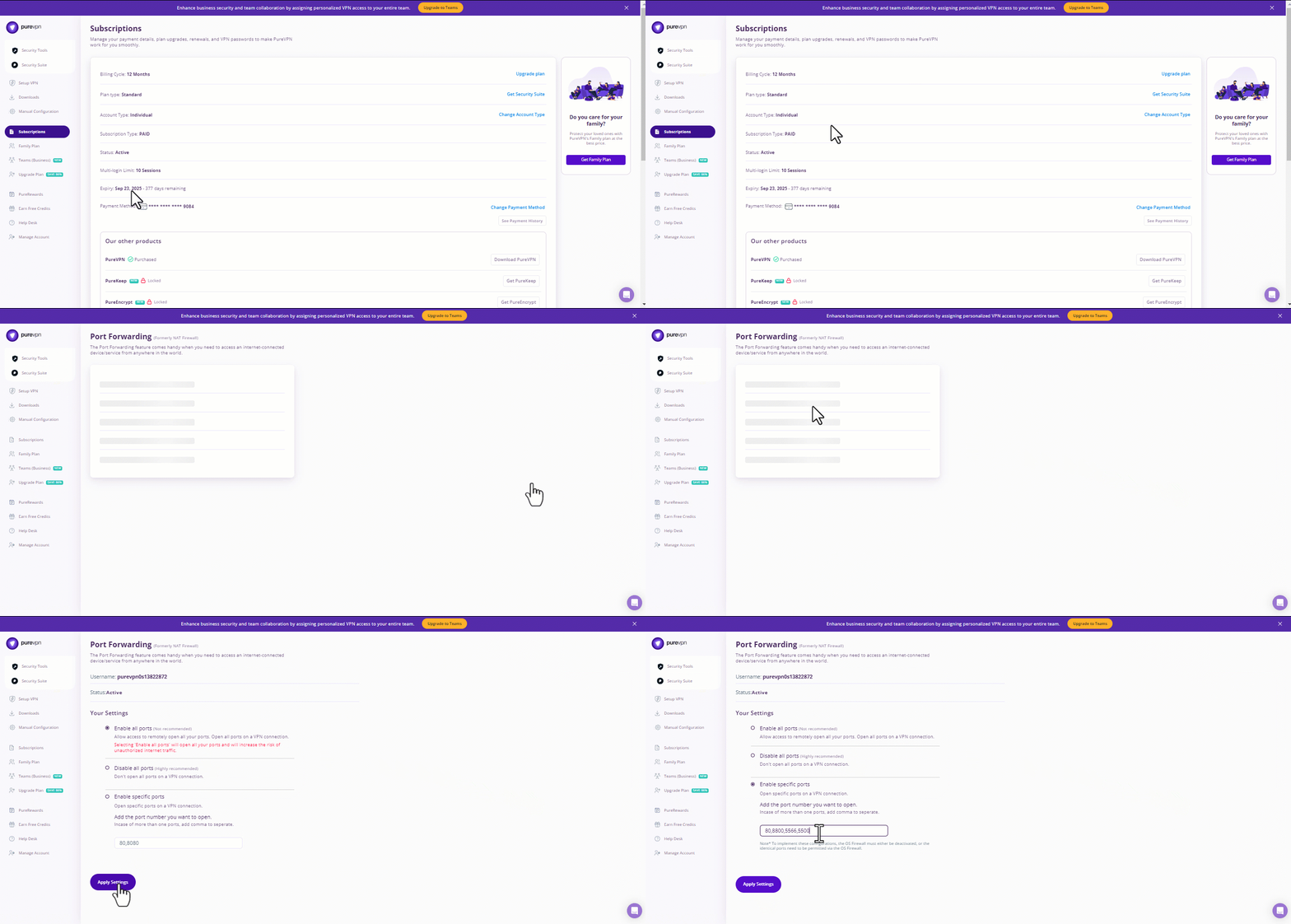
With a Port Forwarding add-on and a dedicated IP, you can easily bypass CGNAT and port forward multiple routers (Netgear, TP-Link, ASUS) for multiplayer, single-player, and RPG games. Just follow the below-mentioned simple steps and go for it:
- Login to the PureVPN member area.
- Click the subscription tab.
- Click Configure.
- Apply your desired port settings.
- Click Apply settings.
Frequently Asked Questions (FAQs)
-
Do I need port forwarding for single-player games?

You can use port forwarding for single-player games to improve connection stability for features like leaderboards and challenges.
-
What if port forwarding doesn't work?
Check your router settings, ensure the correct ports are forwarded, and verify your IP address. Reach out to your ISP if these port forwarding issues persist.
-
Do I need to forward ports for World of Tanks on a console (PS4, Xbox)?
To handle connection requests automatically, you can port forward World of Tanks on a console.
-
My router doesn't have a port forwarding option. What can I do?
If your router doesn't have port forwarding options, you may need to upgrade to a more advanced router or use UPnP (Universal Plug and Play) if supported.
In Summary
Play multiplayer games like World of Tanks with PureVPN's port forwarding add-on and dedicated IP address and experience a seamless gaming experience today!